RACING & COMPETITION AREA PROCEDURES
Warm-Up
Athletes are to warm up in a manner so as to not cause disturbance to athletes who may be racing. Pay attention to announcements made in the warm-up area.
Pre-Race Marshaling
An official will invite rowers to the competition area around 10 minutes before the scheduled race. They will confirm your attendance and check your heat and erg assignment.
Race Floor
Please inform the organisers of any health issues you may have before entering the race floor.
Each erg is numbered.
Go to your assigned erg.
Confirm that your name is on the monitor.
Alert an official if your name is not on your erg.
Do NOT sit at an erg with someone else’s name on it.
Important Note on Age categories
The Malta National Indoor Rowing Championships operates a policy that all athletes aged 16+ who qualify as Juniors or Masters will race together but get separate rankings as “Open” and “Junior”/”Masters”. More specifically, there will be:
(a) Open Age Categories: Applicable for all athletes aged 16 and over for the 500m, 1000m and 2000m. Medals will be awarded to those placing 1st, 2nd and 3rd in the Women (W), Men (M), LW-W and LW-M categories.
(b) The U19 Youths Categories: Applicable for the 500m, 1000m and 2000m races. As per World Rowing rules, a rower may compete in an Under 19 event until 31st of December of the year in which they reach the age of 18. Medals will be awarded to those placing 1st, 2nd and 3rd in the in one of these categories:
U13 – applicable for athletes (subdivided in W, M) participating in an event held on or before the 31st of December of the year in which they reach the age of 13. U13 athletes must be accompanied by a responsible adult and do not need to declare their weight.
U16 – applicable for athletes (subdivided in W, M) participating in an event held on or before the 31st of December of the year in which they reach the age of 16. U16 athletes must be accompanied by a responsible adult and do not need to declare their weight. However, athletes who reach the age of 16 in the year of the championship, whose 16th birthday is before the date of the championships, may, if they request so, be entered in both the U16 and open categories. Athletes within this age bracket who qualify to compete as LW will be weighed 1-2 hrs before their race.
U19 – subdivided in W, M, LW-W, LW-W. As per World Rowing Regulations, a rower may compete in an Under 19 event until 31st of December of the year in which they reach the age of 18.
(c) Masters Age Categories: Applicable for the 500m, 1000m and 2000m races for adults who have reached their 30th birthday by the day of the competition. Separate rankings and medals will be awarded to those placing 1st, 2nd and 3rd in the Women (W), Men (M), Light-Weight Women (LW-W) and Light-Weight Men (LW-M) categories. Further sub-categories for Masters will be as follows: 30-39, 40-49, 50-59, 60-70, 70+ These are based on the competitor’s age on the day of the Championship. For example, a competitor whose 40th birthday is on the day of the Championship would compete in 40-49 category. For international record purposes, the 30+ age group may be further split into other sub-categories.
Note that in some cases (e.g. the number of competitors in a particular event exceed the number of available ergs), more than one race (heat) will be held and an overall ranking will be produced combining the times of the various heats.
Before The Start
Get settled quickly. There will be a short 2-3 minute window for final race prep.
Adjustments are allowed to the seat, foot stretcher, vent, and drag factor only.
Vent and drag factor may not be changed once the race has started.
Officials will ask that you put your handle down.
Erg fans cannot be moving at the start of the race.
The system will start once the ergs are stationary.
Athletes are permitted a single coach or coxswain who must stay to the rear and may not come in contact with athlete unless pre-authorised to do so.
Start
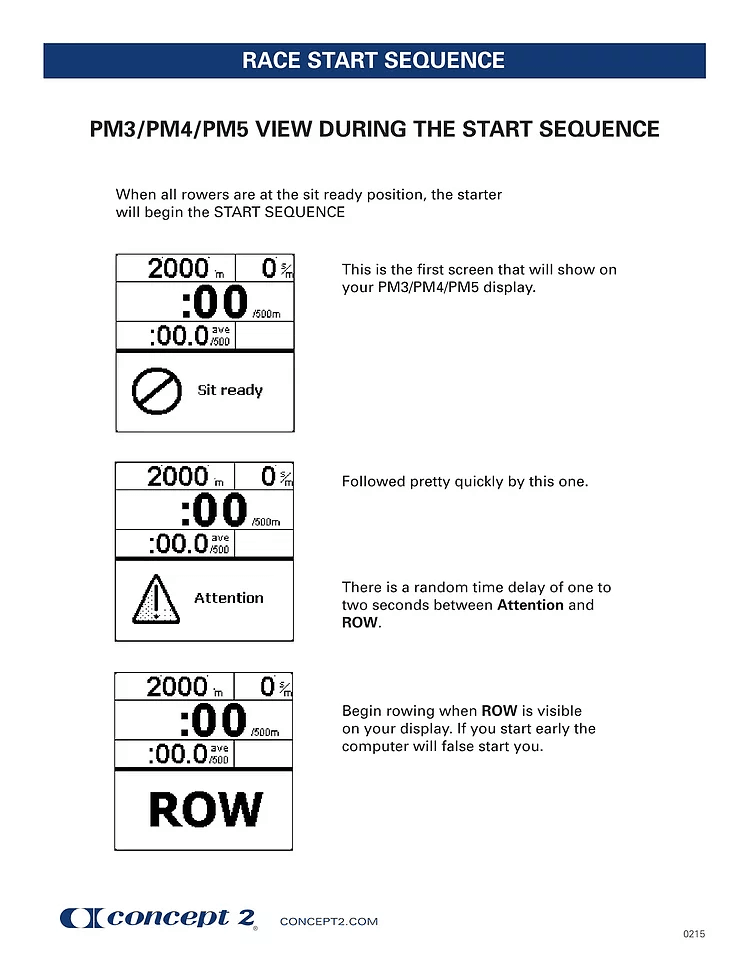
Rowers will take the start command from the PM5 monitor on the Concept2 Erg.
The visual commands will be;
“SIT READY”
“ATTENTION”
“ROW.”
The clock starts with the “ROW” command and not after the handle is pulled. *Please refer to diagram at bottom.
The Concept2 Venue Racing System will detect and alert a false start.
Only one false start for a race is allowed. Any subsequent false starts will be automatic disqualification *at the discretion of regatta officials.
During the Race
If your erg becomes disconnected from the Concept 2 Venue Racing System DO NOT STOP ROWING. After about 10 seconds the PM5 monitor will display “KEEP ROWING” at the bottom of the screen.
All data is retained on the PM5. Your time will be recorded on your Athlete Registration Card and entered manually into the race system.
If any other mechanical problem develops early during an event alert a regatta official immediately. You may be moved to an unoccupied erg or be rescheduled following an appropriate rest period.
Remember that information on the PM5 monitor reflects times and positions for your section (“race”) of ergs only. Your event may use more than one race and in that case your monitor does not reflect your place in the overall event. Row your hardest, best race.
Vent and drag factor may not be changed once the race has started.
Rowers may be disqualified if the handle is allowed to slam the erg!
Although not recommended, headphones may be worn during competition. They cannot interfere with the rower’s ability to hear instructions.
End of the Race
Alert medical staff, referee or race official immediately if you experience abnormal breathing or other health problems.
Under normal circumstances times are recorded automatically by the Concept 2 Venue Racing System.
As a backup, volunteer timers may record times manually. BE SURE YOUR TIME IS RECORDED CORRECTLY. The rower may be asked to initial the manually recorded result to indicate that the recorded time is correct.
Stay at your erg until instructed to leave.
Leave the race floor as directed by the officials. Coaches and coxswains may also leave by the same route as the rower.
PERFORMANCE MONITOR RACE DISPLAY
The information below explains the start procedure and what is displayed on your Performance Monitor during your race.
Pre-Race Checks
- Check that the erg is functioning well. Alert the race organisers if this is not the case.
- Adjust the drag factor to the setting you want to race on (it is displayed in the bottom right hand corner). Do this by adjusting the damper lever and rowing 3–6 strokes.
Race Start Procedure
Shortly before your race starts the race controller will ask you to stop rowing. Put the handle in the handle hook.
Your monitor display will change to show “Stop, prepare for start.”
Once this screen appears, you will not be able to change the display.
The race controller will announce that the race is going to start and tell the competitors to pick up their handles. When you pick up the handle do not pull on it as you may trigger a false start.WATCH YOUR MONITOR.
It will display
- “Sit ready,”
- “Attention,”
- “ROW.”
Once it displays “ROW” start racing.
Important
The time between “Attention” and “ROW” is different for each race to prevent people from trying to predict the start and jump it.
If a false start occurs, the monitor will display “False Start” and will list the lanes responsible.
Stop rowing and put the handle back in the handle hook. Steps 2–4 will be repeated.
Don’t false start or it can lead to a disqualification.* Please refer to false Start rules in previous paragraphs
Race Display
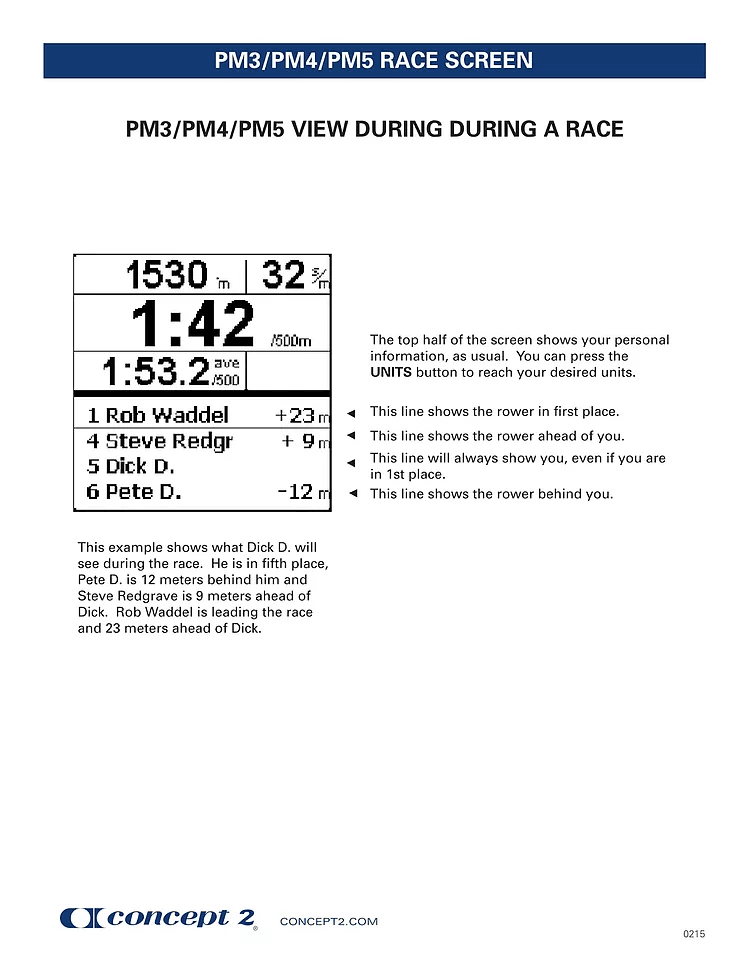
Above the Thick Black Line
Top left of screen: distance to go (or time to go for a timed race)
Top right of screen: stroke rate
Centre of screen (large letters): pace/500m split
Bottom left of screen: average split /500m
The centre of screen and bottom left will vary depending on what units you chose before the race.
Below the Thick Black Line
This section will show four lines of information:
Line 1: This will show the leader on your race system and the number of meters they are ahead of you.
Line 2: This will show the person immediately in front of you on your race system with the number of meters they are ahead.
Line 3: This will show your name.
Line 4: This will show the person immediately behind you and the number of meters they are behind.
If you are leading the race on your race system you will only see Lines 3 and 4.
At the end of the race, your final time and those just ahead/behind will show in the lower half of the screen.
Health and Safety
Your health and safety, and that of others around you, should ALWAYS come first.
Screen Views:
 Malta Rowing Federation